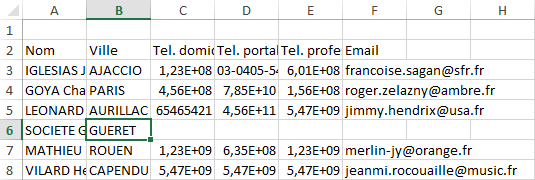
Bonjours, j'ai un projet en cours ou je dois récupérer un Excel à partir d'un html qui me montre une liste. J'utilise code igniter au passage.

Cependant j'arrive bien à télécharger mon fichier Excel mais impossible d'avoir une mise en forme correct... (autosize des largeurs de colones ou récupération du css de mon affichage web).

Mon export_manager

Code : Sélectionner tout - Visualiser dans une fenêtre à part
1
2
3
4
5
6
7
8
9
10
11
12
13
14
15
16
17
18
19
20
21
22
23
24
25
26
27
28
29
30
31
32
33
34
35
36
37
38
39
40
41
42
43
44
45
46
47
48
49
50
51
52
53
54
55
56
57
58
59
60
61
62
public function export_excel()
    {
 
         if($this->input->post("html")){
            $filename = "export.xlsx";   
            $path_name = TMPPATH.'export.xlsx';
             $html_content = iconv("UTF-8", "CP1252", $this->input->post("html"));
            $html_content = str_replace('$and$', '&', $html_content);
 
            if(file_exists($path_name)){
                unlink($path_name);
            }
 
            //$this->load->library('zend');
            $this->load->library('phpexcel');
 
          //    PHPExcel_Autoloader::Load("PHPExcel_Reader_HTML");
          //    PHPExcel_Autoloader::Load("PHPExcel_Writer_Excel2007");
            $tmpfile=time().'.html';
            file_put_contents($tmpfile, $html_content);
 
            $reader = new PHPExcel_Reader_HTML;
            $content = $reader->load($tmpfile);
 
            $objWriter = PHPExcel_IOFactory::createWriter($content, 'Excel2007');
            $objWriter->save($path_name);
 
            /* Ne marche pas
             
            $objet = PHPExcel_IOFactory::createReader('Excel2007');
            $objet->setReadDataOnly(true);
            $excel = $objet->load('tmp/export.xlsx');
            $sheet = $excel->getSheet(0);
 
            for($col = 'A'; $col !== 'G'; $col++)
            {
             $sheet->getActiveSheet()
             ->getColumnDimension($col)
             ->setAutoSize(true);
            }
 
            $writer = PHPExcel_IOFactory::createWriter($excel);
            $writer->save('tmp/Export.xlsx'); <br>
                 
        */ 
 
            unlink($tmpfile);  
            echo json_encode(array("filename" => $path_name));
         }    
    }
 
    public function download_excel()
    {
 
            $this->load->helper('download');
            $filename = "export.xlsx";
            $path_name = TMPPATH.$filename;
            $data =  file_get_contents($path_name);
            force_download($filename,$data);
            return true;
 
    }
Mon script admin:

Code : Sélectionner tout - Visualiser dans une fenêtre à part
1
2
3
4
5
6
7
8
9
10
11
12
13
14
15
16
17
18
19
20
21
22
23
24
25
26
27
28
29
30
31
32
33
34
35
36
37
38
39
 $( "#export_excel" ).click(function() {
        var html_content = $("#export_excel_content").html();
 
 
        alert(html_content);
        /*
        var options = {
            "url": "export_manager/export_xlsx",
            "data": "data=" + html_content,
            "type": "post",
        }
       $.ajax(options);
        */
 
        $.blockUI({ message: "<h3 class='h3-w95'>Fichier en cours de création...</h3>" ,});
        var url = "export_manager/export_excel";
        html_content= html_content.replace("&","$and$");
 
        $.ajax({
            type: "POST",
            url: url,
            data:  "html="+html_content,
 
        })
        .done(function( json ){
            if(json["filename"] != "null"){
                window.location.href = "export_manager/download_excel";
            }
 
            $.unblockUI();
        });


    });


});
Je cherche depuis une semaine et soit en suivant le tuto j'applique le style mais sans les données. Soit l'inverse...