IdentifiantMot de passe
Loading...
Mot de passe oublié ?Je m'inscris ! (gratuit)
Navigation

Inscrivez-vous gratuitement
pour pouvoir participer, suivre les réponses en temps réel, voter pour les messages, poser vos propres questions et recevoir la newsletter

Composants Java Discussion :

JList avec images


Sujet :

Composants Java

Vue hybride

Message précédent Message précédent   Message suivant Message suivant
  1. #1
    Membre averti
    Inscrit en
    Août 2010
    Messages
    19
    Détails du profil
    Informations forums :
    Inscription : Août 2010
    Messages : 19
    Par défaut JList avec images
    Bonjour !

    J'aimerais que ma JList puisse afficher des images. J'ai déjà trouvé comment faire ici :
    http://www.java2s.com/Code/Java/Swin...ntinaction.htm

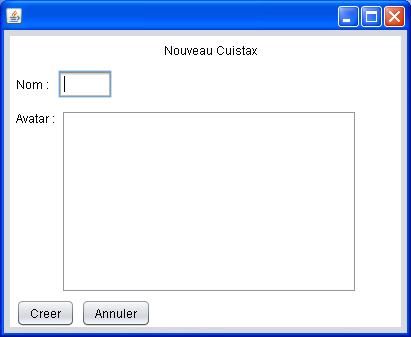
    Mais là c'est pour créer une JList dans une fenêtre. Or moi j'ai un Jpanel avec plusieurs autres composants comme ceci :

    (avatar est ma JList).

    J'ai donc séparé le code précédent en différentes classes mais si je fais :
    Code : Sélectionner tout - Visualiser dans une fenêtre à part
    1
    2
    3
    4
    public JFrameNew() {
      initComponents();        
      setContentPane(new SwingListExample());     
    }
    Je me retrouve uniquement avec une Jlist dans une fenêtre et plus ce que j'ai fait avant.

    Merci d'avance pour votre aide

  2. #2
    Membre chevronné Avatar de Ceddoc
    Homme Profil pro
    Développeur Java
    Inscrit en
    Janvier 2009
    Messages
    493
    Détails du profil
    Informations personnelles :
    Sexe : Homme
    Âge : 36
    Localisation : France, Rhône (Rhône Alpes)

    Informations professionnelles :
    Activité : Développeur Java
    Secteur : High Tech - Multimédia et Internet

    Informations forums :
    Inscription : Janvier 2009
    Messages : 493
    Par défaut
    Code : Sélectionner tout - Visualiser dans une fenêtre à part
    setContentPane(new SwingListExample());
    Ce morceau de code signifie que le panneau qui sera affiché dans ta JFrame sera SwingListExample Ce qui va écraser tous ce qui a été défini précédemment.

    Essaye un truc du genre
    Code : Sélectionner tout - Visualiser dans une fenêtre à part
    getContentPane().add(new SwingListExample());
    Si ce n'est pas ça, donne nous plus de code s'il te plait

  3. #3
    Membre averti
    Inscrit en
    Août 2010
    Messages
    19
    Détails du profil
    Informations forums :
    Inscription : Août 2010
    Messages : 19
    Par défaut
    Tout d'abord, voilà le code précédent décomposé en 3 parties :

    1) Une classe SwingListExample

    Code : Sélectionner tout - Visualiser dans une fenêtre à part
    1
    2
    3
    4
    5
    6
    7
    8
    9
    10
    11
    12
    13
    14
    15
    16
    17
    18
    19
    20
    21
    22
    23
    24
    25
    26
    27
    28
    29
    30
    31
    32
    33
    34
    35
    36
    37
    38
    39
    40
    41
    42
    43
    44
    45
    46
    47
    48
    49
    50
    51
    52
    53
    54
    55
    56
    57
    58
    59
    60
    61
    62
    63
    64
    65
    66
    67
    68
    69
    70
    71
    72
    73
    74
    75
    76
    77
    78
    79
    80
    81
     
    package projet;
     
    import java.awt.BorderLayout;
    import java.awt.event.ActionEvent;
    import java.awt.event.ActionListener;
     
    import javax.swing.ImageIcon;
    import javax.swing.JButton;
    import javax.swing.JFrame;
    import javax.swing.JList;
    import javax.swing.JPanel;
    import javax.swing.JScrollPane;


    public class SwingListExample extends JPanel {
     
      private BookEntry books[] = {
          new BookEntry(createImageIcon("test.jpg")),
          new BookEntry(createImageIcon("Images\\archi.jpg")),
          new BookEntry(createImageIcon("Images\\eii.jpg")),
          new BookEntry(createImageIcon("Images\\medecine.jpg)),
          new BookEntry(createImageIcon("Images\\psycho.jpg")),
          new BookEntry(createImageIcon("Images\\sciences.jpg")),
          new BookEntry(createImageIcon("Images\\sciencesdulangage.jpg")),
          new BookEntry(createImageIcon("Images\\scienceshumainesetso.jpg")),
          new BookEntry(createImageIcon("Images\\umons.jpg")) };
     
      private JList booklist = new JList(books);
     
      public SwingListExample() {
        setLayout(new BorderLayout());
        JButton button = new JButton("Print");
        button.addActionListener(new PrintListener());
     
        booklist = new JList(books);
        booklist.setCellRenderer(new BookCellRenderer());
        booklist.setVisibleRowCount(4);
        JScrollPane pane = new JScrollPane(booklist);
     
        add(pane, BorderLayout.NORTH);
        add(button, BorderLayout.SOUTH);
     
     
      }
     
      public static void main(String s[]) {
        JFrame frame = new JFrame("List Example");
        frame.setDefaultCloseOperation(JFrame.EXIT_ON_CLOSE);
        frame.setContentPane(new SwingListExample());
        frame.pack();
        frame.setVisible(true);
      }
     
        private ImageIcon createImageIcon(String path) {
     
     
            java.net.URL imgURL = getClass().getResource(path);
            if (imgURL != null) {
                return new ImageIcon(imgURL);
            } else {
                System.err.println("Couldn't find file: " + path);
                return null;
            }
        }
     
      // An inner class to respond to clicks on the Print button
      class PrintListener implements ActionListener {
        public void actionPerformed(ActionEvent e) {
          int selected[] = booklist.getSelectedIndices();
          System.out.println("Selected Elements:  ");
     
          for (int i = 0; i < selected.length; i++) {
            BookEntry element = (BookEntry) booklist.getModel()
                .getElementAt(selected[i]);
            System.out.println("  " + element.getTitle());
          }
        }
      }
    }
    Il y a certainement des trucs à retirer, je n'ai pas besoin du jButton "Print" ni du Listener mais j'ai un peu peur d'enlever des trucs qui sont utiles, donc pour l'instant j'ai rien enlevé tant que ça ne fonctionne pas.

    2) La class BookEntry qui reçoit une imageicon et un string même si pour l'instant je n'ai besoin que d'une imageicon (mais plus loin j'aurai besoin des deux)
    Code : Sélectionner tout - Visualiser dans une fenêtre à part
    1
    2
    3
    4
    5
    6
    7
    8
    9
    10
    11
    12
    13
    14
    15
    16
    17
    18
    19
    20
    21
    22
    23
    24
    25
    26
    27
    28
    29
    30
    31
    32
    33
    34
    35
    36
    37
    38
    39
    40
    41
    42
     
    package projet;
     
    import javax.swing.ImageIcon;
     
    /**
     *
     * @author François
     */
    public class BookEntry {
        private final String title;
      private final ImageIcon imagePath;


      public BookEntry(String title, ImageIcon imagePath) {
        this.title = title;
        this.imagePath = imagePath;
      }
     
        public BookEntry(ImageIcon imagePath) {
            this.imagePath = imagePath;
            title=null;
        }


      public String getTitle() {
        return title;
      }
     
      public ImageIcon getImage() {
     
        return imagePath;
      }
     
      // Override standard toString method to give a useful result
      public String toString() {
        return title;
      }
     
    }
    3) La class BookCellRenderer

    Code : Sélectionner tout - Visualiser dans une fenêtre à part
    1
    2
    3
    4
    5
    6
    7
    8
    9
    10
    11
    12
    13
    14
    15
    16
    17
    18
    19
    20
    21
    22
    23
    24
    25
    26
    27
    28
    29
    30
    31
    32
    33
    34
    35
    package projet;
     
    import java.awt.Color;
    import java.awt.Component;
    import javax.swing.JLabel;
    import javax.swing.JList;
    import javax.swing.ListCellRenderer;
     
    /**
     *
     * @author François
     */
    class BookCellRenderer extends JLabel implements ListCellRenderer {
      private static final Color HIGHLIGHT_COLOR = new Color(0, 0, 128);
     
      public BookCellRenderer() {
        setOpaque(true);
        setIconTextGap(12);
      }
     
      public Component getListCellRendererComponent(JList list, Object value,
          int index, boolean isSelected, boolean cellHasFocus) {
        BookEntry entry = (BookEntry) value;
        setText(entry.getTitle());
        setIcon(entry.getImage());
        if (isSelected) {
          setBackground(HIGHLIGHT_COLOR);
          setForeground(Color.white);
        } else {
          setBackground(Color.white);
          setForeground(Color.black);
        }
        return this;
      }
    }
    Ca se sont mes "outils" on va dire, si je fais tourner SwingListExample ça me crée bien une jList avec images.

    Maintenant il y a ce que j'ai déjà fait et je voudrais intégrer une jList d'image là-dedans :


    Code : Sélectionner tout - Visualiser dans une fenêtre à part
    1
    2
    3
    4
    5
    6
    7
    8
    9
    10
    11
    12
    13
    14
    15
    16
    17
    18
    19
    20
    21
    22
    23
    24
    25
    26
    27
    28
    29
    30
    31
    32
    33
    34
    35
    36
    37
    38
    39
    40
    41
    42
    43
    44
    45
    46
    47
    48
    49
    50
    51
    52
    53
    54
    55
    56
    57
    58
    59
    60
    61
    62
    63
    64
    65
    66
    67
    68
    69
    70
    71
    72
    73
    74
    75
    76
    77
    78
    79
    80
    81
    82
    83
    84
    85
    86
    87
    88
    89
    90
    91
    92
    93
    94
    95
    96
    97
    98
    99
    100
    101
    102
    103
    104
    105
    106
    107
    108
    109
    110
    111
    112
    113
    114
    115
    116
    117
    118
    119
    120
    121
    122
    123
    124
    125
    126
    127
    128
    129
    130
    131
    132
    133
    134
    135
    136
    137
    138
    139
    140
    141
    142
    143
    144
    145
    146
    147
    148
    149
    150
    151
    152
    153
    154
    155
    156
    157
    158
    159
    160
    161
    162
    163
    164
    165
    166
    167
    168
    169
    170
    171
    172
    173
    174
    175
    176
    177
    178
    179
    180
    181
    182
    183
    184
    185
    186
    187
    188
    189
    190
    191
    192
    193
    194
    195
    package projet;
     
     
    import java.awt.BorderLayout;
    import java.awt.Component;
    import javax.swing.DefaultListModel;
    import javax.swing.ImageIcon;
    import javax.swing.JList;
    import javax.swing.JScrollPane;
    import javax.swing.ListCellRenderer;
     
    /**
     *
     * @author François
     */
    public final class JFrameNew extends javax.swing.JFrame {
     
        //BookEntry tab[]=new BookEntry [12];


        /** Creates new form JFrameNew */
        public JFrameNew() {
            initComponents();
            /*tab[0]=new BookEntry (createImageIcon("Images\\archi.jpg"));
            tab[1]=new BookEntry (createImageIcon("Images\\droit.bmp"));
            tab[2]=new BookEntry (createImageIcon("Images\\eii.bmp"));
            tab[3]=new BookEntry (createImageIcon("Images\\medecine.bmp"));
            tab[4]=new BookEntry (createImageIcon("Images\\polytech1.bmp"));
            tab[5]=new BookEntry (createImageIcon("Images\\polytech2.bmp"));
            tab[6]=new BookEntry (createImageIcon("Images\\psycho.bmp"));
            tab[7]=new BookEntry (createImageIcon("Images\\sciences.bmp"));
            tab[8]=new BookEntry (createImageIcon("Images\\sciencesdulangage.bmp"));
            tab[9]=new BookEntry (createImageIcon("Images\\scienceshumainesetso.bmp"));
            tab[10]=new BookEntry (createImageIcon("Images\\umons.bmp"));
            tab[11]=new BookEntry (createImageIcon("Images\\wawa.bmp"));*/


        }
     
        /** This method is called from within the constructor to
         * initialize the form.
         * WARNING: Do NOT modify this code. The content of this method is
         * always regenerated by the Form Editor.
         */
        @SuppressWarnings("unchecked")
        // <editor-fold defaultstate="collapsed" desc="Generated Code">                          
        private void initComponents() {
     
            jPanel1 = new javax.swing.JPanel();
            jLabel1 = new javax.swing.JLabel();
            jLabel2 = new javax.swing.JLabel();
            jTextField1 = new javax.swing.JTextField();
            jLabel3 = new javax.swing.JLabel();
            jScrollPane1 = new javax.swing.JScrollPane();
            jList1 = new javax.swing.JList();
            jButton1 = new javax.swing.JButton();
            jButton2 = new javax.swing.JButton();
     
            setDefaultCloseOperation(javax.swing.WindowConstants.EXIT_ON_CLOSE);
     
            jPanel1.setBackground(new java.awt.Color(255, 255, 255));
     
            jLabel1.setText("Nouveau Cuistax");
     
            jLabel2.setText("Nom : ");
     
            jLabel3.setText("Avatar :");
     
            jList1.setSelectionMode(javax.swing.ListSelectionModel.SINGLE_SELECTION);
            jScrollPane1.setViewportView(jList1);
     
            jButton1.setText("Creer");
     
            jButton2.setText("Annuler");
     
            javax.swing.GroupLayout jPanel1Layout = new javax.swing.GroupLayout(jPanel1);
            jPanel1.setLayout(jPanel1Layout);
            jPanel1Layout.setHorizontalGroup(
                jPanel1Layout.createParallelGroup(javax.swing.GroupLayout.Alignment.LEADING)
                .addGroup(javax.swing.GroupLayout.Alignment.TRAILING, jPanel1Layout.createSequentialGroup()
                    .addContainerGap(154, Short.MAX_VALUE)
                    .addComponent(jLabel1)
                    .addGap(144, 144, 144))
                .addGroup(jPanel1Layout.createSequentialGroup()
                    .addContainerGap()
                    .addComponent(jLabel2)
                    .addPreferredGap(javax.swing.LayoutStyle.ComponentPlacement.RELATED)
                    .addComponent(jTextField1, javax.swing.GroupLayout.PREFERRED_SIZE, 54, javax.swing.GroupLayout.PREFERRED_SIZE)
                    .addContainerGap(281, Short.MAX_VALUE))
                .addGroup(jPanel1Layout.createSequentialGroup()
                    .addContainerGap()
                    .addComponent(jLabel3)
                    .addPreferredGap(javax.swing.LayoutStyle.ComponentPlacement.RELATED)
                    .addComponent(jScrollPane1, javax.swing.GroupLayout.PREFERRED_SIZE, 296, javax.swing.GroupLayout.PREFERRED_SIZE)
                    .addContainerGap(30, Short.MAX_VALUE))
                .addGroup(jPanel1Layout.createSequentialGroup()
                    .addContainerGap()
                    .addComponent(jButton1)
                    .addPreferredGap(javax.swing.LayoutStyle.ComponentPlacement.RELATED)
                    .addComponent(jButton2)
                    .addContainerGap(236, Short.MAX_VALUE))
            );
            jPanel1Layout.setVerticalGroup(
                jPanel1Layout.createParallelGroup(javax.swing.GroupLayout.Alignment.LEADING)
                .addGroup(jPanel1Layout.createSequentialGroup()
                    .addContainerGap()
                    .addComponent(jLabel1)
                    .addPreferredGap(javax.swing.LayoutStyle.ComponentPlacement.UNRELATED)
                    .addGroup(jPanel1Layout.createParallelGroup(javax.swing.GroupLayout.Alignment.BASELINE)
                        .addComponent(jLabel2)
                        .addComponent(jTextField1, javax.swing.GroupLayout.PREFERRED_SIZE, javax.swing.GroupLayout.DEFAULT_SIZE, javax.swing.GroupLayout.PREFERRED_SIZE))
                    .addPreferredGap(javax.swing.LayoutStyle.ComponentPlacement.UNRELATED)
                    .addGroup(jPanel1Layout.createParallelGroup(javax.swing.GroupLayout.Alignment.LEADING)
                        .addComponent(jLabel3)
                        .addComponent(jScrollPane1, javax.swing.GroupLayout.PREFERRED_SIZE, 183, javax.swing.GroupLayout.PREFERRED_SIZE))
                    .addPreferredGap(javax.swing.LayoutStyle.ComponentPlacement.RELATED, javax.swing.GroupLayout.DEFAULT_SIZE, Short.MAX_VALUE)
                    .addGroup(jPanel1Layout.createParallelGroup(javax.swing.GroupLayout.Alignment.BASELINE)
                        .addComponent(jButton1)
                        .addComponent(jButton2)))
            );
     
            javax.swing.GroupLayout layout = new javax.swing.GroupLayout(getContentPane());
            getContentPane().setLayout(layout);
            layout.setHorizontalGroup(
                layout.createParallelGroup(javax.swing.GroupLayout.Alignment.LEADING)
                .addGroup(layout.createSequentialGroup()
                    .addContainerGap()
                    .addComponent(jPanel1, javax.swing.GroupLayout.DEFAULT_SIZE, javax.swing.GroupLayout.DEFAULT_SIZE, Short.MAX_VALUE)
                    .addContainerGap())
            );
            layout.setVerticalGroup(
                layout.createParallelGroup(javax.swing.GroupLayout.Alignment.LEADING)
                .addGroup(layout.createSequentialGroup()
                    .addContainerGap()
                    .addComponent(jPanel1, javax.swing.GroupLayout.DEFAULT_SIZE, javax.swing.GroupLayout.DEFAULT_SIZE, Short.MAX_VALUE)
                    .addContainerGap())
            );
     
            pack();
        }// </editor-fold>                        
     
        /**
         * @param args the command line arguments
         */
        /** Returns an ImageIcon, or null if the path was invalid. */
     
     
        public static void main(String args[]) {
            /* Set the Nimbus look and feel */
            //<editor-fold defaultstate="collapsed" desc=" Look and feel setting code (optional) ">
            /* If Nimbus (introduced in Java SE 6) is not available, stay with the default look and feel.
             * For details see http://download.oracle.com/javase/tutorial/uiswing/lookandfeel/plaf.html 
             */
            try {
                for (javax.swing.UIManager.LookAndFeelInfo info : javax.swing.UIManager.getInstalledLookAndFeels()) {
                    if ("Nimbus".equals(info.getName())) {
                        javax.swing.UIManager.setLookAndFeel(info.getClassName());
                        break;
                    }
                }
            } catch (ClassNotFoundException ex) {
                java.util.logging.Logger.getLogger(JFrameNew.class.getName()).log(java.util.logging.Level.SEVERE, null, ex);
            } catch (InstantiationException ex) {
                java.util.logging.Logger.getLogger(JFrameNew.class.getName()).log(java.util.logging.Level.SEVERE, null, ex);
            } catch (IllegalAccessException ex) {
                java.util.logging.Logger.getLogger(JFrameNew.class.getName()).log(java.util.logging.Level.SEVERE, null, ex);
            } catch (javax.swing.UnsupportedLookAndFeelException ex) {
                java.util.logging.Logger.getLogger(JFrameNew.class.getName()).log(java.util.logging.Level.SEVERE, null, ex);
            }
            //</editor-fold>
     
            /* Create and display the form */
            java.awt.EventQueue.invokeLater(new Runnable() {
     
                @Override
                public void run() {
                    new JFrameNew().setVisible(true);
                }
            });
        }
        // Variables declaration - do not modify                     
        private javax.swing.JButton jButton1;
        private javax.swing.JButton jButton2;
        private javax.swing.JLabel jLabel1;
        private javax.swing.JLabel jLabel2;
        private javax.swing.JLabel jLabel3;
        private javax.swing.JList jList1;
        private javax.swing.JPanel jPanel1;
        private javax.swing.JScrollPane jScrollPane1;
        private javax.swing.JTextField jTextField1;
        // End of variables declaration                   
    }
    Ma jList concernée c'est jList1. Il faudrait donc que jList1 affiche des images.

    Maintenant ce sont les liens entre tout ça que je n'arrive pas à établir. Dois-je passer jList1 en paramètre dans la fonction SwingListExample ?

Discussions similaires

  1. [CSS] débutante : un entête fixe avec image dans le CSS
    Par khany dans le forum Mise en page CSS
    Réponses: 2
    Dernier message: 13/06/2005, 16h23
  2. projet de base Interbase 7.5 avec images
    Par KRis dans le forum InterBase
    Réponses: 8
    Dernier message: 13/06/2005, 11h17
  3. alignement input avec image
    Par Shabata dans le forum Balisage (X)HTML et validation W3C
    Réponses: 5
    Dernier message: 24/02/2005, 10h45
  4. Formulaire et bouton submit avec image mapée
    Par dody dans le forum Général JavaScript
    Réponses: 7
    Dernier message: 06/12/2004, 17h00
  5. boîte de dialogue avec image de fond + texte
    Par Eugénie dans le forum MFC
    Réponses: 13
    Dernier message: 31/08/2004, 14h32

Partager

Partager
  • Envoyer la discussion sur Viadeo
  • Envoyer la discussion sur Twitter
  • Envoyer la discussion sur Google
  • Envoyer la discussion sur Facebook
  • Envoyer la discussion sur Digg
  • Envoyer la discussion sur Delicious
  • Envoyer la discussion sur MySpace
  • Envoyer la discussion sur Yahoo