1
2
3
4
5
6
7
8
9
10
11
12
13
14
15
16
17
18
19
20
21
22
23
24
25
26
27
28
29
30
31
32
33
34
35
36
37
38
39
40
41
42
43
44
45
46
47
48
49
50
51
52
53
54
55
56
57
58
59
60
61
62
63
64
65
66
67
68
69
70
71
72
73
74
75
76
77
78
79
80
81
82
83
84
85
86
87
88
89
90
91
92
93
94
95
96
97
98
99
100
101
102
103
104
105
106
107
108
109
110
111
112
113
114
115
116
117
118
119
120
121
122
123
124
125
126
127
128
129
130
131
132
133
134
135
136
137
138
139
140
141
142
143
144
145
146
147
148
149
150
151
152
153
154
155
156
157
158
159
|
package com.bic.btt_prototype;

import static com.bic.btt_prototype.ToolBox.iLog;

import android.content.Context;
import android.graphics.PixelFormat;
import android.os.Build;
import android.os.IBinder;
import android.view.ContextThemeWrapper;
import android.view.Gravity;
import android.view.View;
import android.view.WindowInsets;
import android.view.WindowInsetsController;
import android.view.WindowManager;
import android.widget.FrameLayout;

import androidx.annotation.NonNull;
import androidx.annotation.Nullable;
import androidx.annotation.RequiresApi;
import androidx.coordinatorlayout.widget.CoordinatorLayout;
import androidx.core.view.GravityCompat;
import androidx.core.view.ViewCompat;

import com.google.android.material.snackbar.Snackbar;

public class snackbarwrapper
{
    private final CharSequence text;
    private final int duration;
    private final WindowManager windowManager;
    private final Context appplicationContext;
    @Nullable
    private Snackbar.Callback externalCallback;
    @Nullable
    private Action action;

    @NonNull
    public static snackbarwrapper make(@NonNull Context applicationContext, @NonNull CharSequence text, @Snackbar.Duration int duration)
    {
        return new snackbarwrapper(applicationContext, text, duration);
    }

    private snackbarwrapper(@NonNull final Context appplicationContext, @NonNull CharSequence text, @Snackbar.Duration int duration)
    {
        this.appplicationContext = appplicationContext;
        this.windowManager = (WindowManager) appplicationContext.getSystemService(Context.WINDOW_SERVICE);
        this.text = text;
        this.duration = duration;
    }

    public void show()
    {
        WindowManager.LayoutParams layoutParams = createDefaultLayoutParams(WindowManager.LayoutParams.TYPE_APPLICATION_OVERLAY, null);
        windowManager.addView(new FrameLayout(appplicationContext)
        {
            @RequiresApi(api = Build.VERSION_CODES.R)
            @Override
            protected void onAttachedToWindow()
            {
                super.onAttachedToWindow();
                onRootViewAvailable(this);
            }

        }, layoutParams);

    }

    private void onRootViewAvailable(final FrameLayout rootView)
    {
        final CoordinatorLayout snackbarContainer = new CoordinatorLayout(new ContextThemeWrapper(appplicationContext, R.style.FOL_Theme_SnackbarWrapper))
        {
            @Override
            public void onAttachedToWindow()
            {
                super.onAttachedToWindow();
                onSnackbarContainerAttached(rootView, this);
            }
        };
        windowManager.addView(snackbarContainer, createDefaultLayoutParams(WindowManager.LayoutParams.TYPE_APPLICATION_PANEL, rootView.getWindowToken()));
    }

    private void onSnackbarContainerAttached(final View rootView, final CoordinatorLayout snackbarContainer)
    {
        Snackbar snackbar = Snackbar.make(snackbarContainer, text, duration);
        snackbar.setCallback(new Snackbar.Callback()
        {
            @Override
            public void onDismissed(Snackbar snackbar, int event)
            {
                super.onDismissed(snackbar, event);
                // Clean up (NOTE! This callback can be called multiple times)
                if (snackbarContainer.getParent() != null && rootView.getParent() != null)
                {
                    windowManager.removeView(snackbarContainer);
                    windowManager.removeView(rootView);
                }
                if (externalCallback != null)
                {
                    externalCallback.onDismissed(snackbar, event);
                }
            }

            @Override
            public void onShown(Snackbar snackbar)
            {
                super.onShown(snackbar);
                if (externalCallback != null)
                {
                    externalCallback.onShown(snackbar);
                }
            }
        });
        if (action != null)
        {
            snackbar.setAction(action.text, action.listener);
        }
        snackbar.show();
    }

    private WindowManager.LayoutParams createDefaultLayoutParams(int type, @Nullable IBinder windowToken)
    {
        WindowManager.LayoutParams layoutParams = new WindowManager.LayoutParams();
        layoutParams.format = PixelFormat.TRANSLUCENT;
        layoutParams.width = WindowManager.LayoutParams.MATCH_PARENT;
        layoutParams.height = WindowManager.LayoutParams.WRAP_CONTENT;
        layoutParams.gravity = GravityCompat.getAbsoluteGravity(Gravity.CENTER_HORIZONTAL | Gravity.BOTTOM, ViewCompat.LAYOUT_DIRECTION_LTR);
        layoutParams.flags = WindowManager.LayoutParams.FLAG_NOT_TOUCH_MODAL;
        layoutParams.type = type;
        layoutParams.token = windowToken;
        return layoutParams;
    }

    @NonNull
    public snackbarwrapper setCallback(@Nullable Snackbar.Callback callback)
    {
        this.externalCallback = callback;
        return this;
    }

    @NonNull
    public snackbarwrapper setAction(CharSequence text, final View.OnClickListener listener)
    {
        action = new Action(text, listener);
        return this;
    }

    private static class Action
    {
        private final CharSequence text;
        private final View.OnClickListener listener;

        public Action(CharSequence text, View.OnClickListener listener)
        {
            this.text = text;
            this.listener = listener;
        }
    }
} |




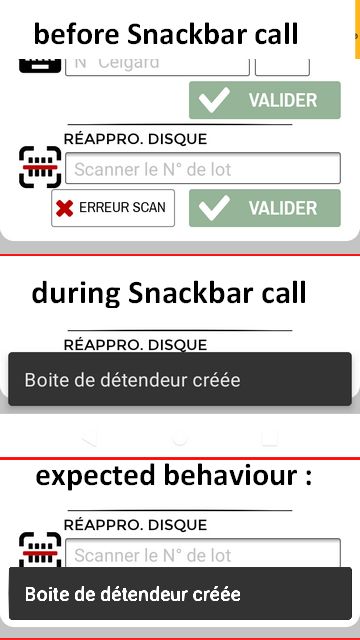
 Réapparition incontrolée de l'UI Android lors de l'utilisation du SnackBar wrapper : d'où cela provient ?
 Répondre avec citation




Partager